

VideoProc Introduces AI-Powered Enhancement Workflow for High-Quality Video Editing
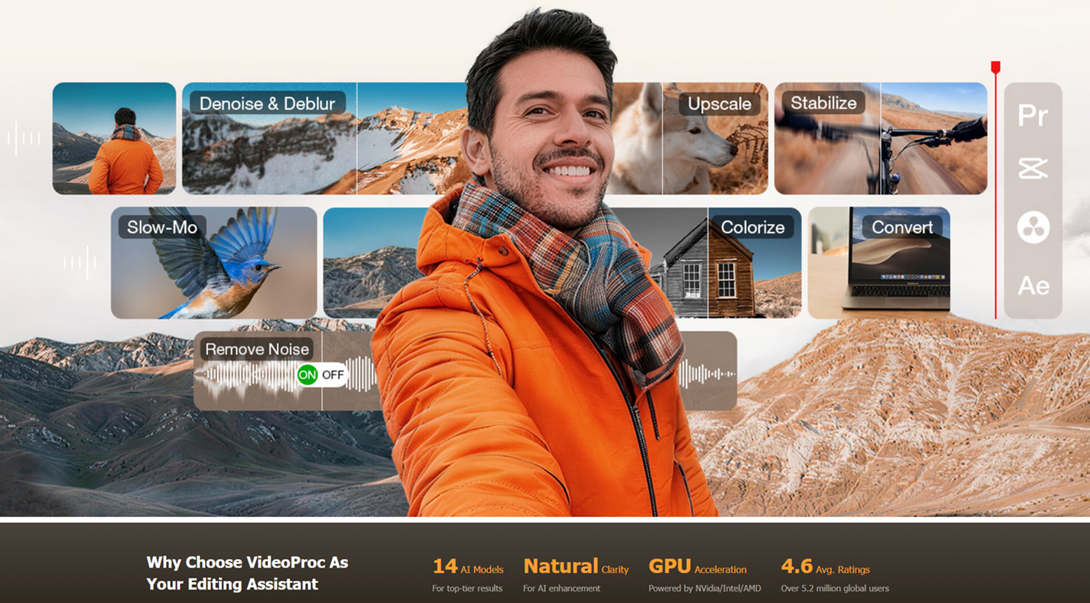
AI-Enhance Videos for Editing
VideoProc unveils AI-powered workflow for editors, enhancing video & audio before or after editing to deliver publish-ready content fast.
CHENGDU, SICHUAN, CHINA, January 14, 2026 /EINPresswire.com/ -- VideoProc today unveiled an AI-driven enhancement initiative for video editors, vloggers, and content creators, targeting quality improvements without adding load to the editing timeline. The initiative tackles a persistent but often overlooked issue in post-production: real-world footage problems typically surface before editing even starts.
“In today’s fast-moving digital landscape, audiences are less tolerant of low-quality video,” said Angie Tane, Marketing Manager at VideoProc. “High-resolution, clean content is more likely to be promoted by platforms and rewarded with positive engagement. Even if source footage isn’t perfect, AI-powered enhancement can bring videos up to publish-ready standards, without reshooting or compromising timelines.”
More details on the AI enhancement workflow are available at the Feature Page:
https://www.videoproc.com/video-converting-software/feature-ai-enhancer-for-editor.htm
Solving Quality Issues Before Editing
VideoProc Converter AI is built as a pre-edit and post-lock tool that works alongside traditional NLEs like Premiere Pro or DaVinci Resolve, rather than replacing them. By handling computationally heavy AI tasks outside the timeline, editors can focus on creative decisions while maintaining responsive workflows.
At the core of the workflow is AI Super Resolution, an automated, all-in-one enhancement:
Denoise: Automatically remove visual noise and grain from low-light vlogs, indoor tutorials, or high-ISO scenarios.
Practical Editing Applications:
• Smooth nighttime or indoor vlogs.
• Enhance clarity in high-ISO outdoor situations.
• Prepare handheld or drone footage for clean timeline playback.
Deblur: Automatically correct blurs from compressed, zoomed, or out-of-focus clips
Practical Editing Applications:
• Improve clarity of soft or downloaded clips.
• Sharpen fast-moving action or sports clips.
• Eliminate compression artifacts such as blocking, ringing, and banding.
Upscale: Transform low-resolution, such as 480p or 720p downloads, archives, or AI-generated videos, into crisp HD or 4K with natural textures and detail.
Practical Editing Applications:
• Punch in or out on wide shots to emphasize key details.
• Crop full-frame recordings to medium or close-up compositions.
• Zoom into interface areas for tutorials or software demos.
Additional Workflow Enhancements
AI Frame Interpolation: Boost frame rates to 60fps, 120fps, or higher to smooth fast-moving action, correct motion inconsistencies in AI-generated content, or create slow-motion effects without re-shooting.
Stabilization: Smooth out shaky footage from handheld cameras, drones, or action cams, making your clips look steady and professional without reshooting.
Preparing Multi-Format Media for Modern Workflows
VideoProc Converter AI also handles images, audio, and file management:
• Image AI: Upscale, restore, and colorize photos or AI-generated visuals. Batch processing accelerates large projects.
• Audio AI: Reduce noise, remove vocals, or separate music tracks for vlogs, tutorials, or voiceovers.
• Format & File Management: Convert footage to NLE-friendly formats, compress files for smoother editing and delivery, and maintain quality across platforms.
• Additional Tools: 4K screen recorder and online downloader streamline content acquisition.
Editing and Publishing Made Easy
During editing, VideoProc Vlogger offers a lightweight non-linear environment for fast assembly. With pre-enhanced footage, creators avoid running heavy AI effects inside the timeline, reducing lag and maintaining responsive workflows.
After editing, VideoProc Converter AI helps prepare videos for publication: enhance the final work, convert or transcode to meet the requirements of different platforms, and the like.
Availability and Special Offer
To encourage adoption, VideoProc is offering a limited-time, targeted promotion of up to 55% off. This workflow is aimed at editors and creators who want high-quality production without investing in multiple single-purpose AI tools.
By positioning AI enhancement as a parallel, workflow-friendly process, VideoProc enables creators to move from unpolished footage to publication-ready video faster, with consistent quality across projects and platforms.
Take advantage of the VideoProc 2026 Super Sales here: https://www.videoproc.com/campaign/gift-offer.htm
About Digiarty Software
Established in 2006, Digiarty Software is a pioneer in multimedia innovation, offering AI-powered and GPU-accelerated solutions for video and image enhancement, editing, and conversion. With its mission to "Art Up Your Digital Life," the company integrates advanced AI technologies to streamline media processing for professionals and enthusiasts alike. VideoProc, Digiarty’s flagship product, has garnered 5.2 million users across more than 180 countries, reinforcing the company’s role as a leader in digital media innovation.
Viola Nee
Digiarty Software Inc.
+86 28 8513 4884
email us here
Visit us on social media:
Facebook
YouTube
X
Legal Disclaimer:
EIN Presswire provides this news content "as is" without warranty of any kind. We do not accept any responsibility or liability for the accuracy, content, images, videos, licenses, completeness, legality, or reliability of the information contained in this article. If you have any complaints or copyright issues related to this article, kindly contact the author above.
